How it works
From the service call
to the invoice.
BoltWright covers the calls, the schedule, the field app, equipment history, maintenance agreements, customer reports and invoicing. Bolt, the AI built into it, carries the details from one step to the next, so whoever picks up the job knows where it stands.
Start the day knowing
who’s going where.
Phone calls, website requests and portal requests all land in the same queue. Bolt helps you assign the crew with the job and the equipment in front of you.
- Bolt can answer your service line and website chat. It never books anyone or promises a time; the request waits for the office.
- The office starts the day on one list: new requests, unassigned visits, reports to review and invoices to send, most urgent first.
- Maintenance agreements and approved repairs go into the same plan.
- Move a visit to someone else and the tech gets one notice, with the final day and time.
Example workflow
Tuesday, lined up.
Ready for the crewQuarterly PM · 4 rooftop units · roof access in job notes
Approved belt replacement · parts noted on the job
Capacity held for urgent service
Live demo
Try what your
customers see.
This is the service desk a BoltWright shop puts on its own website. Pretend you look after a building with a problem, say no heat on the third floor, and tell Bolt about it the way a customer would.
Bolt is answering for Prairie Mechanical, the made-up shop from our demo. It asks what’s wrong, where, and who to call back, then sends the request to the office without making you confirm it. Anything you add or correct after that updates the same request. You get a real reference number, and the request lands in BoltWright’s own Service desk, the same queue an office works from. Nobody gets dispatched or paged.
On your phone line it works the same way. It greets callers by name when their number is on file, follows your after-hours rules, and puts an emergency through to whoever’s on call if the caller asks. Call 587-315-5558 to hear it: Bolt answers as Prairie Mechanical, tells you about BoltWright, and on weekdays can put you through to Mark.
It’s a live AI model, so a reply can take a few seconds. Use made-up names and numbers; what you type is saved with the request.
That’s the customer’s side. What the office does with it, from the queue to a scheduled work order, is what Mark, our founder, shows you in a walkthrough. Book a walkthrough
The chat lives in the corner of the page, the same place a shop’s customers find it on the shop’s own site. Not sure what to say? Try “RTU-3 at Kestrel Place quit heating overnight and the east offices are down to 14 degrees.”
Loading the service desk…
A field app for people
who’d rather not type.
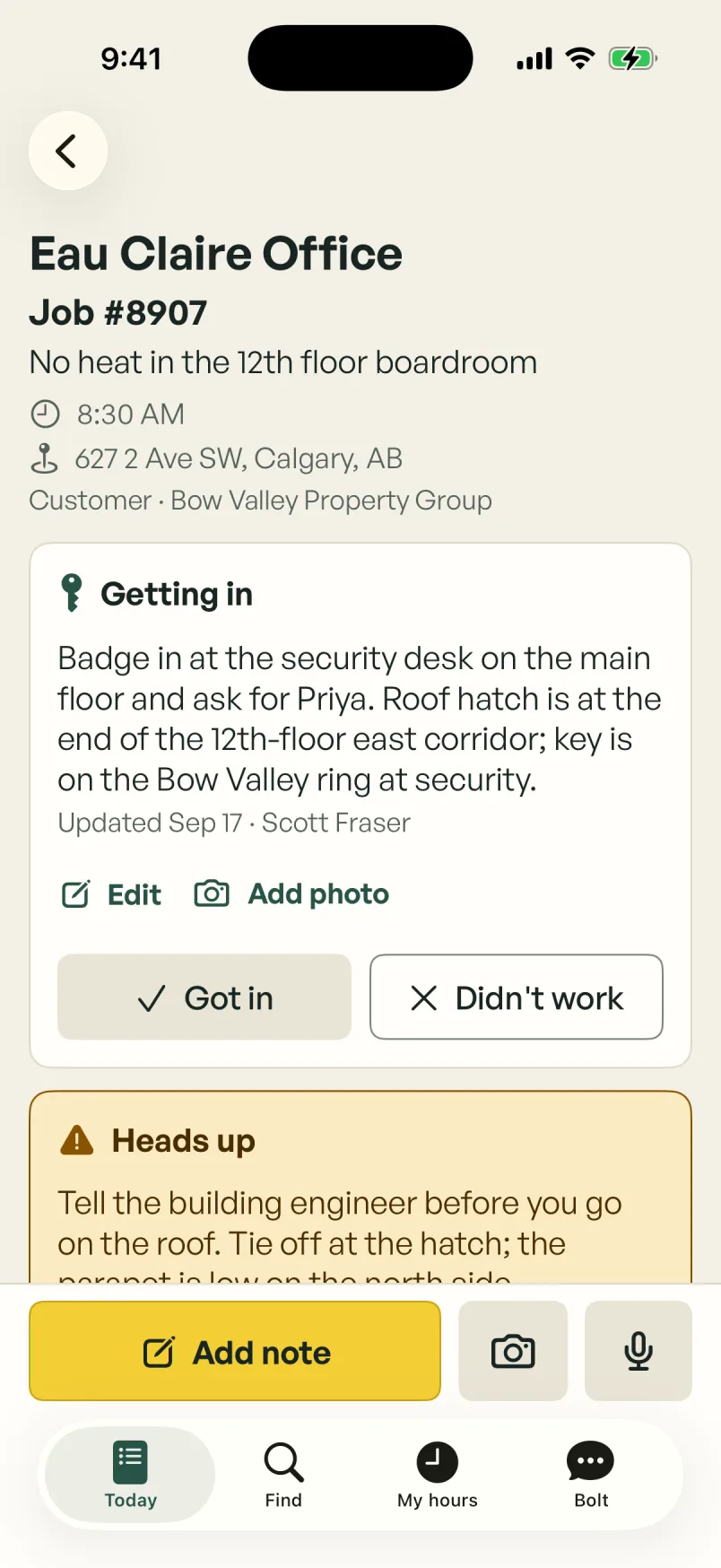
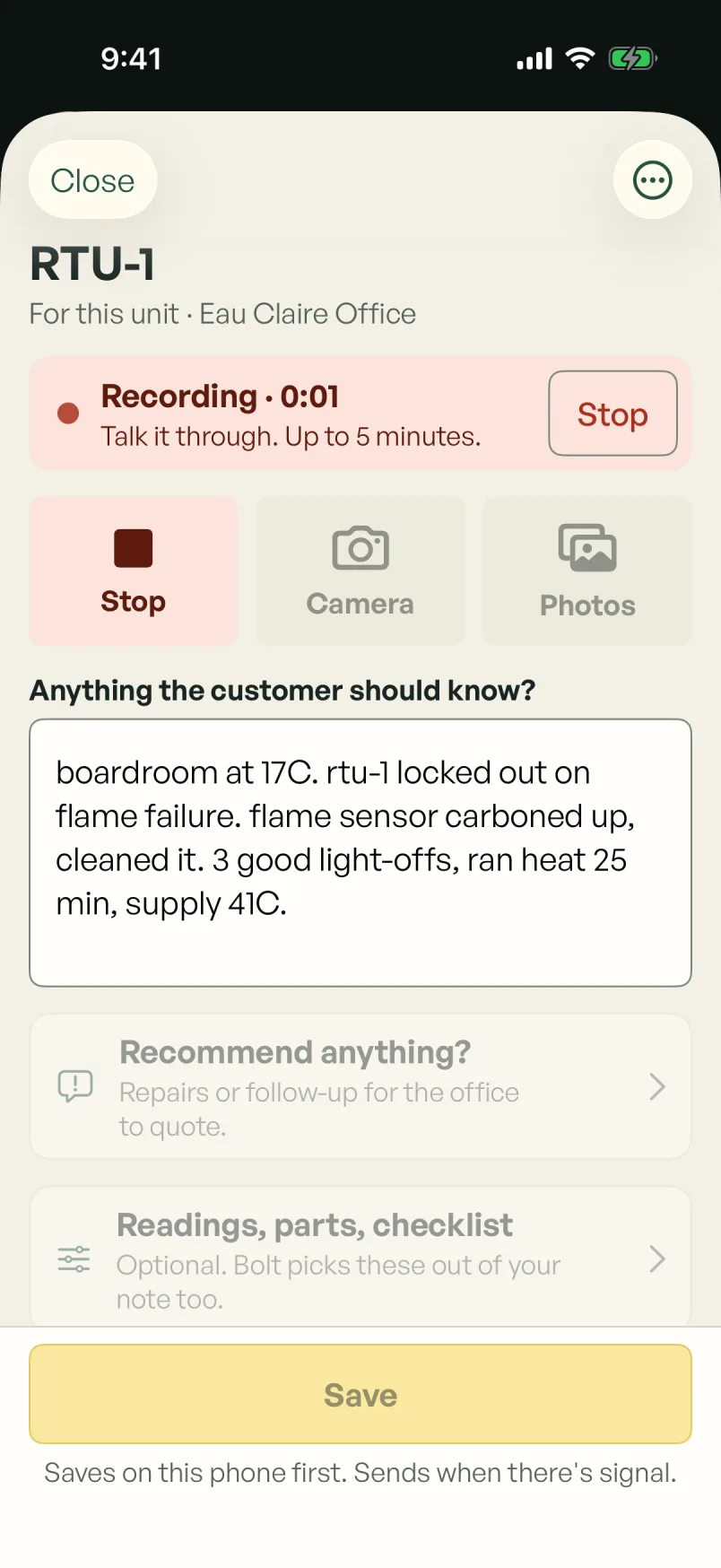
Your tech opens the job and has the site details, the equipment history and the scope. They can talk, type or take photos as they work, and Bolt sorts it out so nobody fills in the same thing twice.
- Access notes for every site: door codes, keys, roof access, hazards and PPE.
- Hours are recorded stop by stop. GPS is optional, and it only helps the tech remember where they were.
- Parts come out of the truck’s kit, and the kit gets refilled back at the shop.
Notes, recorded voice, photos and drafts stay on the phone without reception and sync when it returns. Live conversations with Bolt need a connection.
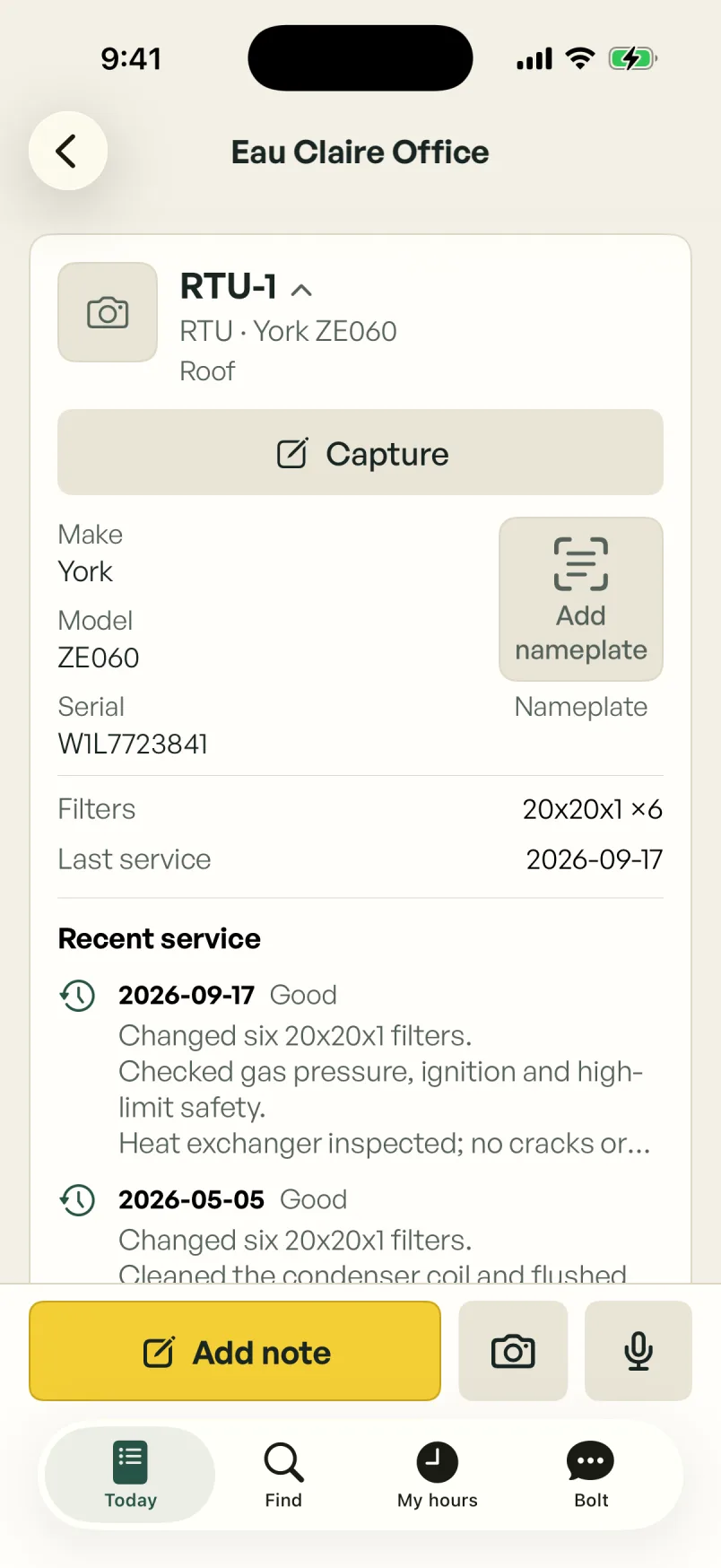
The unit’s history,
before you open the panel.
Readings, repairs and the thing to watch next time are filed against the unit itself, so the next tech starts with what the last one learned.
- Manuals, access notes and repair history stay with each unit.
- The last visit’s notes and photos are there when the next tech opens the job.
- When it’s time to repair or replace, the history backs up the quote.
The customer sees
what you’re taking care of.
The customer gets a report that says what was done, how the equipment was left and which repairs need their decision, quoted separately. Approved repairs are recorded against the equipment, and the office can see what still needs follow-up.
Turn on the portal for a customer, and their facility manager can request service and find past reports without calling the office.
Example workflow
A clear update for Westmere.
Ready for reviewWork completed
Four rooftop units serviced. RTU-2 belt replaced as approved. Operation checked after repair.
What needs a decision
RTU-4 condenser coil is deteriorating. A separate replacement proposal is ready for your review.
Know what
each job made.
Hours, receipts and the parts you’ve costed add up on the job as the work happens. You see what each job earned and cost, and what each customer, technician and building made you this month.
- Invoices start from the job’s own lines: the quote, extras found on site, recorded hours and parts.
- Photograph a receipt and BoltWright reads the supplier, the total and the GST or HST.
- Labour is costed at each tech’s own rate. If a cost is missing, the job says so instead of guessing.
- Set GST, HST, PST or QST on each invoice, then send approved invoices to QuickBooks Online.
- Check the hours before payroll and export them for whoever runs it.
Example job costing
Westmere Centre, September.
ProvisionalBolt asks before a report,
quote or invoice goes out.
Ask Bolt to move a visit, set up a new customer, log a receipt or draft the invoice. Inside the shop, it does what you clearly ask and tells you what it did. A report, quote or invoice goes to a customer only after someone in your office approves it. On the phone and your website chat, Bolt takes the request for the office. It never books a visit or promises a time.
If you already use an AI assistant such as Claude, you can connect it to BoltWright through MCP. It gets your shop’s permissions and follows the same rules.
- ROUTINE
It handles the routine prep.
Preparing the visit, sorting the notes and drafting the report, quote or invoice.
- DECISION
It checks with you first.
Sending a report, quote or invoice, and any change with real consequences, waits for your yes. Bolt reads back what it will do, and nothing happens until you confirm.
- RECORD
It keeps a record you can check.
You can see what happened and why. Corrections keep the original note, so no change is hidden.
Questions owners ask.
Does the team have to talk to AI all day?
No. Techs can tap through the screen, type a note, take a photo or talk, whichever is easier at the time. Talking to Bolt is one option among several.
Will Bolt make things up?
In a customer report, each line about the work has to point to the crew’s note, photo or write-up it came from. A line with nothing behind it is left out of the customer copy and shown to the office instead. It can still mishear a voice note or misread a nameplate, which is why someone in your office reads the report before it goes out. The voice notes guide shows how the draft is built.
Do you train AI on our records?
No. We don’t sell your records, and we don’t train AI models on them without your permission. The AI providers we use don’t train on them either. We may use figures with nothing that identifies your shop or anyone in it, such as how long a typical rooftop unit repair takes, to improve BoltWright. The privacy policy has the details.
Will Bolt make every repair decision?
No. Your tech assesses the equipment and the customer approves the scope. BoltWright records that approval on the job, then what was actually done.
Our maintenance agreements live in spreadsheets. Is that a problem?
No. Send us the spreadsheets and the signed copies. We set up each agreement with its buildings and covered units, signed copy attached, for you to check, and where a contract has lapsed we suggest a price from what you billed there over the past year, for you to confirm. BoltWright doesn’t draft the usual per-job invoice for a PM visit made from an agreement, so a finished visit isn’t billed again on top of it. A repair found on the visit becomes a quote, and once the customer approves it, it’s its own job to invoice.
Do you track parts and stock?
Shop stock and truck kits, yes. Receive filters at the shop, load a truck’s kit, record what gets used on each job and refill the kit when the truck comes back. It counts quantities. It doesn’t handle purchasing or put a value on your inventory.
Where can I see how the app works day to day?
Open the demo shop. It’s the real app with a made-up shop, and you don’t need to sign up. The help pages walk through a tech’s day in Field, working without signal, what happens when the office changes the schedule, and the office side of planning the day and reviewing a report.
Does it work with QuickBooks?
Yes, QuickBooks Online. Approved invoices go across one way, with your customers, items and taxes mapped during setup, and we check the first few with you or your bookkeeper. If you use different accounting software, ask us on the walkthrough.
A bigger business.
And a life outside it.
Tell me about a recent job, or bring a work order, and I’ll run it through BoltWright from the first call to the invoice. You don’t need to prepare anything.